


433MHz Universal Wireless Remote Control Switch DC 12V 1CH Relay Module (2 Transmitters + Receiver)
Couldn't load pickup availability
Secure checkout
Friendly support
Hassle-free returns
How to set the working mode of the switch controller?
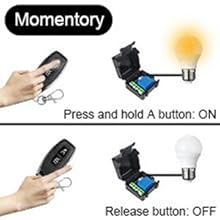
Set Momentary Mode
Step 1.Press the receiver's learning button once.
Wait for the LED on the receiver to light on and enter the setting state.
Step 2.Press the button on the remote control (such as A) once.

Set Toggle Mode
Step 1.Press the receiver's learning button twice.
Wait for the Led on the receiver to light on and enter the setting state.
Step 2.Press the button on the remote control (such as A) once.
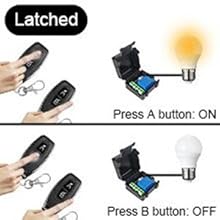
Set Latched Mode
Step 1.Press the receiver's learning button 3 times.
Step 2.Press the button on the remote control (such as A) once.
Step 3.Press another button (such as B) of the same remote control.

Set Delay Mode
Step 1.Press the learn button on the receiver as required (Delay time:press 4 times for 5s,press 5 times for 10s,press 6 times for 15s,press 7 times for 20 s) .
Step 2.Press the button (such as button A) on the remote control once.

Wire diagram and Instruction manual

It is recommended to use a DC power source (not a dry battery) that can supply power for a long period of time to power the product.
WARNING: For the safety of the product and you, do not connect AC power directly to the product input “V+V-”!

Requires a lead from V+ to the COM terminal or there will be no current at the load
It is recommended to use a DC power source (not a dry battery) that can supply power for a long period of time to power the product.
WARNING: For the safety of the product and you, do not connect AC power directly to the product input “V+V-”!

A separate power supply is required to power the load.
It is recommended to use a DC power source (not a dry battery) that can supply power for a long period of time to power the product.
WARNING: For the safety of the product and you, do not connect AC power directly to the product input “V+V-”!

Safety Warning
1. The receiver's power supply terminals (V+/V-) are strictly limited to 12V DC. Connecting to 110V or 220V mains power is strictly prohibited.
2. The output terminals are relay dry contacts (COM/NO/NC), capable of switching mains power up to 250V AC. However, strictly distinguish:
‑ Left screw terminal block = Low-voltage power input (12 V)
‑ Right terminal block = Dry contact output (can connect to mains power)
Always verify terminal markings before wiring. Connecting a live wire to the 12 V terminal will cause immediate circuit board failure.
3. Static current ≤6mA when receiver is in real-time standby mode. Battery operation requires a battery with capacity ≥2000mAh or a 12V regulated power adapter.
4. Standard configuration includes a 433MHz fixed-code transmitter; cannot learn other brand remote controls. Purchase same-brand products if additional remotes are needed.
Ensure your order is placed by 2PM to guarantee next-day delivery! Our commitment to prompt service includes a 24-hour delivery system through our network of carriers, aimed at ensuring your package arrives right on schedule.
Please note, a delivery fee of €4.99 applies for orders under €50. For those in remote areas, be aware that our couriers may apply an extra surcharge. This additional fee helps cover the costs of transporting your items to harder-to-reach locations.